Today’s engines are controlled electronically using software. ECU Tune accesses this software via specially modules in order to bring maximum performance when you want it and retain the comfort of a daily driver when you don’t need it.
The MWMods ECU Tune is a user-friendly device, it stores both MWMods Stage1 file and your vehicles STOCK firmware file and allows an unlimited ability to switch between firmwares . The module plugs directly into the OBD2 port and delivers the Stage1 file to the ECU, programming usually takes 1-3 minutes. The power increase is achieved by adjusting such parameters of the engine control unit as air/fuel ratio, ignition timing , throttle mapping and boost pressure for turbo-charged vehicles.
MWMods ECU software is developed on the dyno and verified with multiple runs and logs.
ECU upgrade for the Mercedes M264 engine offers huge gains in performance across the entire RPM range without sacrificing around town comfort or daily driver reliability.
Stage1 Most Wanted Mods:
– Software changes only , no physical interventions.
– The priority is the resource.
– Maintenance of the stock version = maintenance of the tuned version.
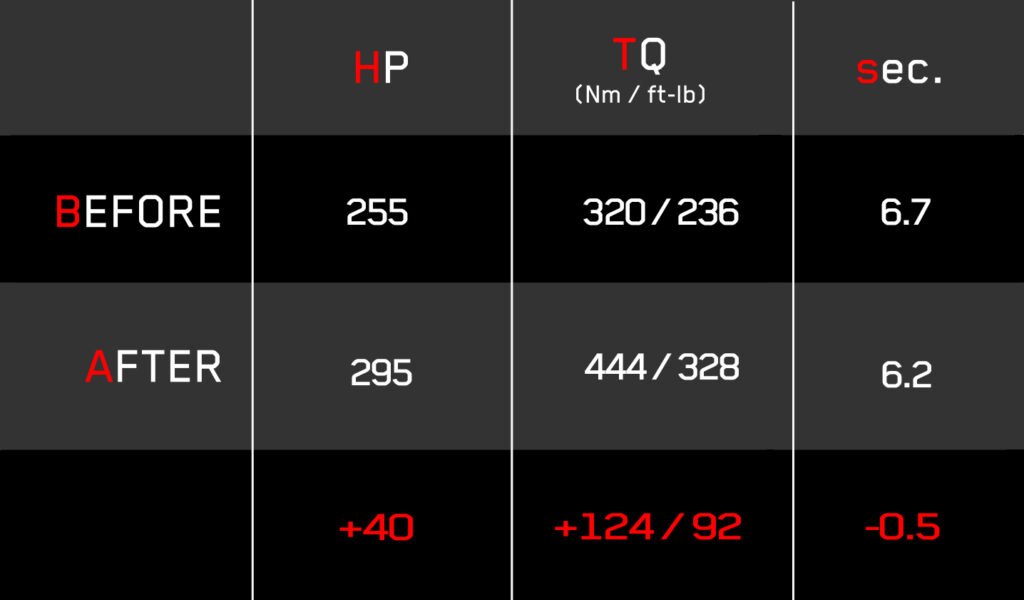
Please refer to the picture below to view the power increase figures for your Mercedes x253 GLC300 Facelift 2.0 turbocharged
Other Mods for your Mercedes below could be recorded on a tune module.
If you order 5+ Mods, there is a 10% discount.
Posted on Amazon Customer 丁寧な対応でした。商品も問題ありませんPosted on Justin As described. Arrived faster than etaPosted on shannon gilbert Real easy to install !Posted on Christian Johnson Solid seller, lowering module functioned as expected, fast shipping!!Posted on Roger A. Moucheron Absolutely worth it, worked instantly!Posted on KEITH C. It's the exact same thing of other name brand modules...."At half the price!!!!!" Worked on my S63 Coupe perfectly!!!!Posted on Amazon Customer goodAmazon rating score: 4.6 of 5, based on 39 reviews
Please read all directions before beginning.
Prepare the Car:
The car must be put into programming mode first
Make sure the car is warm and everything is stable
Make sure the car battery is fully charged
Turn off accessories and unplug any SD or USB devices
Don’t change any settings or press any buttons while programming
The car must be in IGNITION position 2 (all cluster leds are ON but the motor is OFF)
Be Patient in this process, wait a minimum of 60 seconds until the audio head has totally booted up.
Begin Installation:
– switch IGNITION ON (2 click clockwise) or 2 presses of Start/Stop button and make sure you see all cluster LEDS are ON
– wait till your audio head unit totally booted (60 seconds)
– plug module to the OBD2 (diagnostic socket) under the dash and observe the blinking green light on one side of the module
– wait 1-3 minutes before the light stop totally blinking
– installation is finished, unplug the module, ignition off.
You may get an error message in the service screen, for example “Mercedes Connect inoperable” or “Lights are Defective, consult workshop”. You may note the clock has reset to 12:00. Turn the car off, wait a minute, turn it back on, the messages will clear.
Important: Do not leave the module on the OBD connector. Use the module only when you want to switch between Stage1(2) and factory maps.
In addition to the module you will find an SD card on which the factory map is recorded. The SD card from Stage1(2) is already installed in the module. In order to install the Stock map, replace the SD cards and repeat the installation process. Below are instructions on how to disassemble the module:
– open the box with the knife. Do not put the knife more than 2-3mm. Open OBD tune box from the long side not to damage electronics)
– remove the microSD card (just pull it out)
– plug the second microSD card to the socket
– then repeat all actions you did the first time when downloading the Stage1(2) file.
Ask questions
WhatsApp: +375 29 856-85-02
Pay with debit or credit card via PayPal
Fill the form below, click “Pay Now,” and proceed payment. Thats all!